
Master Employee Compliance and Training Certification
The trusted training management logic of Harrington Group International—now available as a powerful, customizable SaaS solution.
No credit card required
Simplify Your Training Management.
Training Manager takes the complexity out of compliance. Our web-based application ensures you never miss an expiration date. Automate assignments, customize your data, and generate audit-ready reports in seconds.
Core Features
Role-Based Assignments
Create roles and automatically assign required training to every relevant employee instantly.
Smart Expiration Tracking
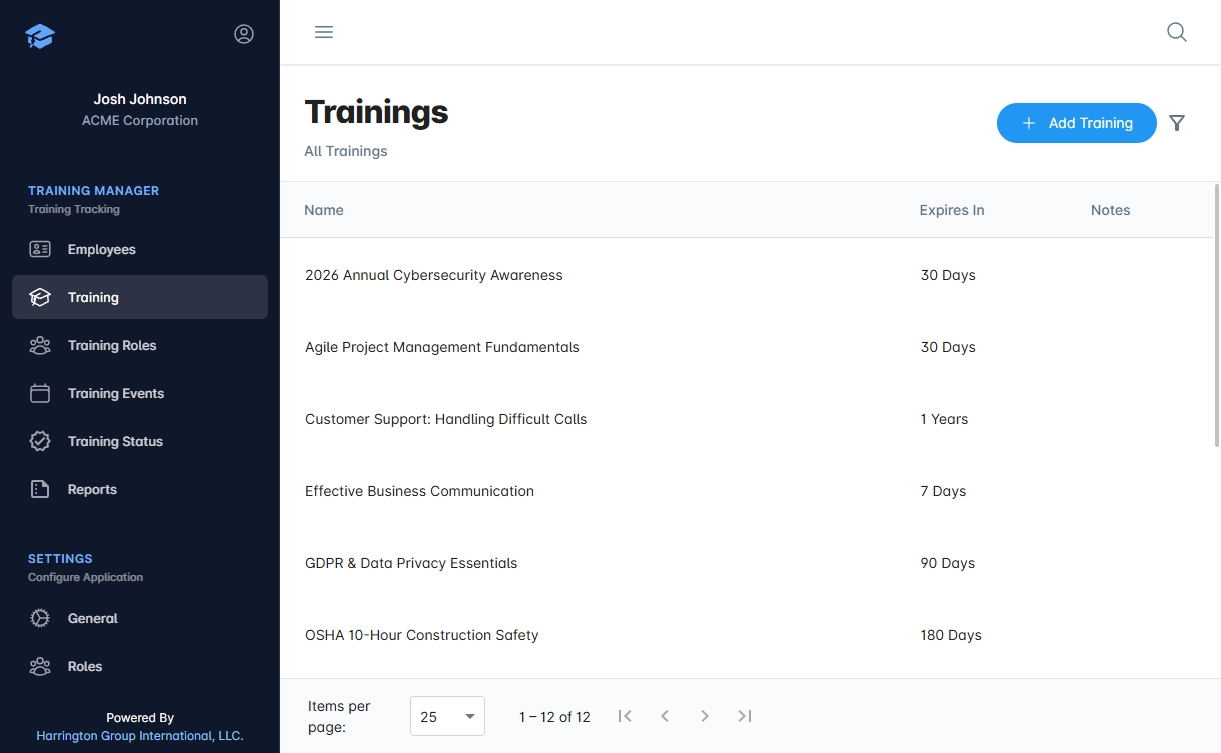
Set expiration periods (days, months, or years). The system automatically tracks when certifications lapse.
Customizable Data Fields
Adapt the software to your business. Add custom fields to employees, trainings, and roles to match your unique requirements.
Dynamic Reporting
Build custom reports with a drag-and-drop interface. Filter, sort, and export your compliance data effortlessly.
Event Scheduling & Tracking
Create training sessions, assign locations, schedule dates, and track attendance. The system automatically updates training history for every attendee.
Audit-Ready Reports
Generate professional PDFs or export data for external analysis instantly. Prepare for audits without the stress.
Built by Training & Compliance Experts
Most software forces you to change your process. Training Manager adapts to you. The app experience is clean and fast so your team can focus on work, not paperwork. Employees, trainings, roles, events, and attachments are always one click away.
- Define Once, Apply Everywhere:Create a role and assign required certifications instantly.
- Instant Onboarding:New employees inherit all required training and expiration timelines automatically.
- Bulk Updates:Add a new safety requirement to a Role and it updates for every assigned employee instantly.
Trusted by teams at


















Migrating from Training Manager 4?
We've made the transition seamless. Download our migration app, sign in with your Training Manager account, and we'll securely import your employees, trainings, roles, events, and attachments—preserving your training history and compliance records.
- Install the Migration App on your Windows machine
- Sign in and choose what to bring over
- Start migrating — we handle the heavy lifting while you maintain compliance

Frequently Asked Questions
Can I customize fields to match my business needs?
Absolutely. Add unlimited custom fields to any record type. Adapt Training Manager to your process—not the other way around.
How does role-based training assignment work?
Create a role, assign required certifications to it, then assign employees to that role. They automatically inherit all training requirements and expiration tracking—no manual data entry needed.
Can I generate audit-ready reports?
Yes. Use our dynamic report builder to select exactly which columns you need, filter by employee, status, role, or custom fields, then export instantly. Perfect for compliance and internal audits.
Can I invite view-only users?
Yes. View-only access is available for $5 per user and is perfect for those who need visibility without editing permissions.
Do you offer discounts for annual plans?
Yes—annual saves 50% and 3-year saves 60% compared to month-to-month pricing, per seat.